
AI Toolbar
Chrome add-on that drafts, summarizes, and translates in one click.
Upvotes
0
Pricing
Freemium
Category
Productivity Tools
In the database since
Oct 2026
Overview
About AI Toolbar
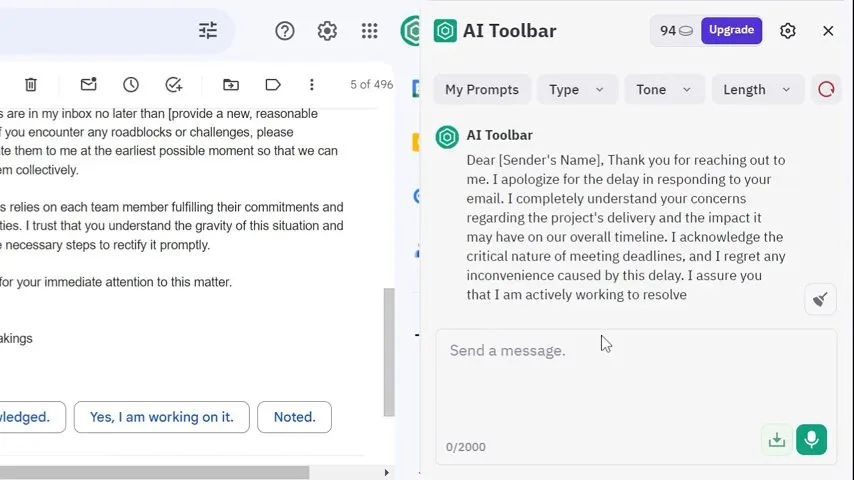
AI Toolbar is a Chrome extension that puts AI tools on any web page. It opens as a side panel inside your browser. You can draft emails, summarize articles, translate text, and chat with a chatbot. It also adds a toolbar on top of ChatGPT and exports answers to Word or PDF. Voice control lets you talk to it too. Over 70,000 professionals use it, per the official site. It has a free option plus a Premium plan. Check the official site for current details.
Key Features
1. Copilot Email Drafting
Draft emails with very little input. Copilot reads the context and writes a message that fits.
2. Summarize or Translate
Select text on any page. Then summarize, translate, paraphrase, analyze, or pull out key data.
3. Built-in Chatbot
Chat with the AI assistant and get useful answers. You can download replies as Word or PDF files.
4. Voice Activation
Talk to your assistant right from your PC. Your voice commands turn into AI actions at once.
5. ChatGPT Integration
AI Toolbar sits at the top of ChatGPT. It adds extra tools to the chat you already use.
6. Works on Any Page
The toolbar runs on every website you visit. AI help is one click away, wherever you browse.
Frequently Asked Questions (FAQ)
How do I install AI Toolbar?
Click Add to Chrome on the official site. The extension installs in seconds, and the toolbar appears in your browser.
What is the difference between Free and Premium?
Both include the copilot, chatbot, voice, and summarize tools. Premium adds custom prompts and unlimited usage, and it uses GPT-5.4 Mini.
Can I export AI Toolbar responses?
Yes. You can download chatbot answers as Word or PDF files, which is handy for reports and notes.
Does AI Toolbar work with ChatGPT?
Yes. It adds a toolbar at the top of ChatGPT, so you get extra AI tools inside the chat.
Which browsers does AI Toolbar support?
It is a Chrome extension, so it works in Chrome and other Chromium-based browsers like Edge and Brave.
How does the summarize tool work?
Select any text on a page and tell the copilot what to do. It can summarize, translate, paraphrase, or extract the key points.
Conclusion
AI Toolbar suits people who want AI help without switching tabs. It brings drafting, summarizing, and translating into every page you visit. The free option covers daily use, while Premium adds unlimited usage and custom prompts. Students, writers, and office workers will like it most. Install it and try the summarize tool first. Check the official site for current pricing.
Keep exploring
Similar AI tools
Ranked by the job they do, their capabilities, and how closely they fit this workflow.