Upvotes
0
Pricing
Freemium
Category
Quiz Generators
In the database since
Oct 2026
Overview
About Questgen
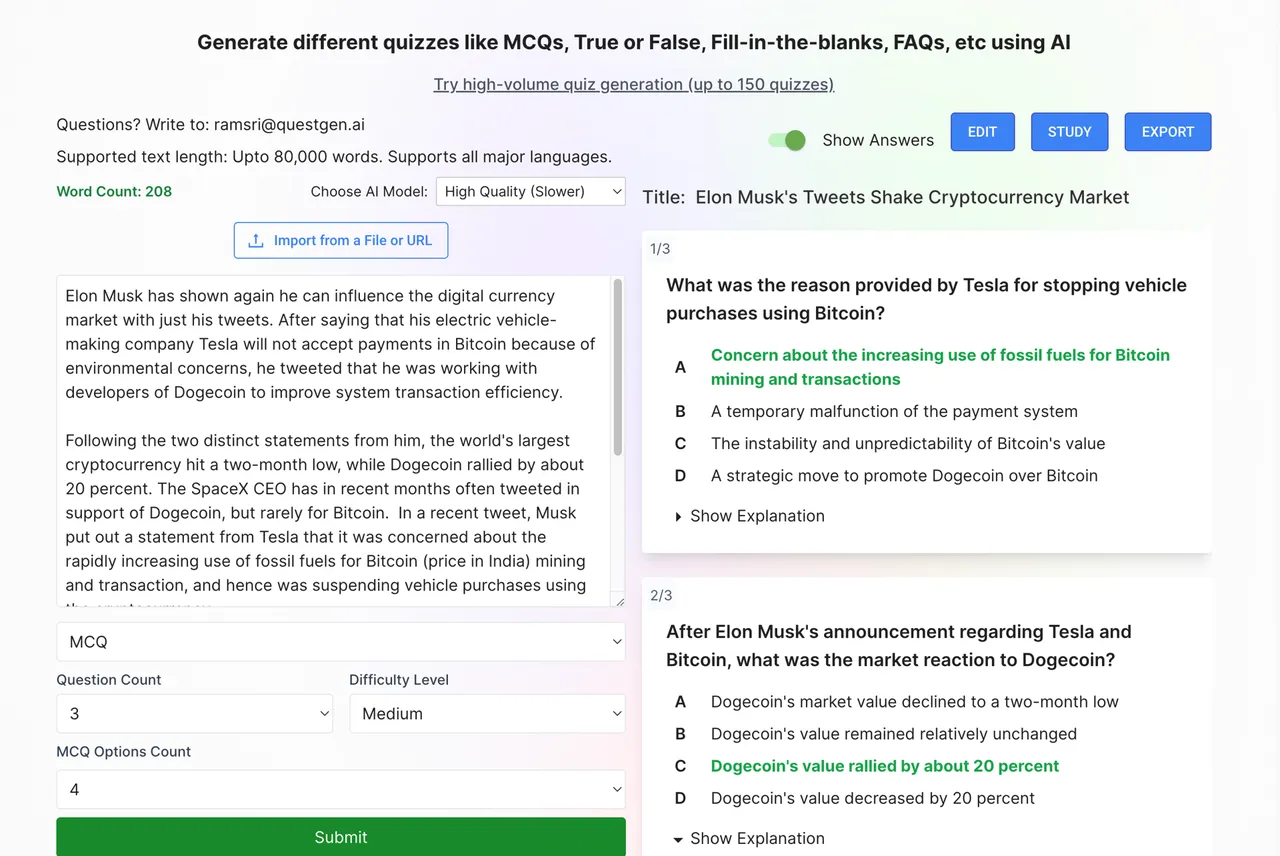
Questgen is an AI quiz generator that turns your study material into ready-made quizzes. You enter text, upload a PDF or image, paste a website link, or even use a video, and the AI creates questions in one click. It supports MCQs, true/false, fill-in-the-blanks, matching, and higher-order questions. Teachers, students, and HR teams use it to save hours of manual work. You can edit every question and export in many formats. Check the official Questgen site for current features and plan details.
Key Features
1. Text to Quiz in One Click
Enter up to 80,000 words of text in any language and get a quiz. High-volume runs can produce 150 quizzes at once.
2. Many Question Types
Generate MCQs, true/false, fill-in-the-blanks, match-the-following, FAQs, and short answers. Higher-order questions test deeper thinking, not just recall.
3. Bloom's Taxonomy Levels
Create questions at any of the six Bloom's levels, from Remember to Create. This helps you match questions to real learning goals.
4. PDF, Image, and Video Inputs
Upload PDFs, textbook snapshots, or audio and video files. The AI reads images, diagrams, and spoken content to build questions.
5. Study Mode for Students
Students can turn any text into a practice quiz and enter Study mode. Auto-graded questions give a score at the end of the session.
6. Many Export Formats
Export quizzes as PDF, CSV, JSON, QTI 2.1, Moodle XML, GIFT, or AIKEN text. The formats work with popular LMS and quiz platforms.
7. Share and Embed Quizzes
Publish a quiz publicly or embed it on any website as an interactive frame. Visitors can take the quiz right on your page.
8. News to Quiz
Enter any topic and the tool pulls current news through web search. It then builds fresh multiple-choice and true/false questions from real events.
Frequently Asked Questions (FAQ)
How does Questgen generate quizzes?
You enter text, upload a document, or paste a link, choose the question types, and click submit. The AI reads your material and creates the questions.
What input formats does it support?
Questgen accepts plain text, PDFs, Word documents, images, website URLs, and audio or video files. Text input supports up to 80,000 words.
What export formats are available?
You can export as PDF, CSV, JSON, QTI 2.1, Moodle XML, GIFT, and AIKEN text, plus CSV layouts made for classroom game platforms.
Can students use Questgen to study?
Yes. Students can generate a quiz from their notes and use Study mode to practice, with auto-grading and a final score.
Can I edit the generated questions?
Yes. You can edit and change every generated question before exporting, so the final quiz matches exactly what you want.
Who is Questgen for?
It is built for teachers, schools, HR teams, students, and textbook publishers who need assessments made quickly from existing material.
Conclusion
Questgen suits anyone who needs real quizzes built from existing material in seconds. Teachers, HR teams, and students all get one-click generation, many question types, and flexible exports. The free start lets you test it on your own material first. It is a strong pick when manual quiz writing eats too much of your week.
Keep exploring
Similar AI tools
Ranked by the job they do, their capabilities, and how closely they fit this workflow.