
Upvotes
0
Pricing
Freemium
Category
Quiz Generators
In the database since
Oct 2026
Overview
About Quizalize
Quizalize is a classroom quiz platform that turns assessments into games students enjoy. Teachers create quizzes, and students play them as multiplayer games like Blockerzz and Goalzz. Every answer feeds a live dashboard that shows who understands the lesson and who needs help. Teachers can auto-assign follow-up practice based on results. It works for formative checks, exam prep, and whole-class energy. AI tools give students instant feedback and help teachers build quizzes from their own materials. Check the official Quizalize site for current features and plan details.
Key Features
1. Multiplayer Classroom Games
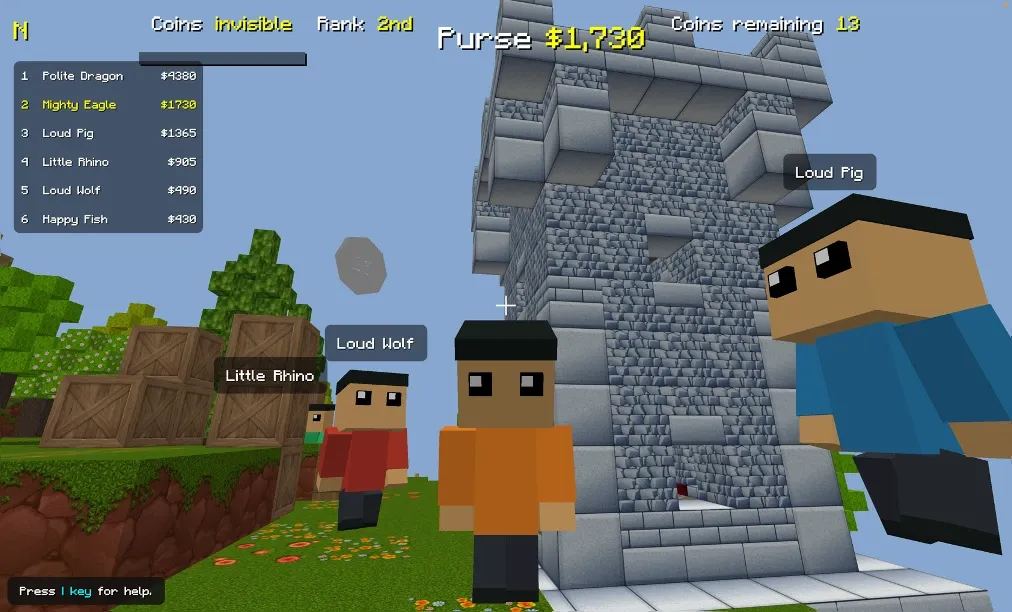
Turn any quiz into games like Blockerzz, Goalzz, Hoopzz, and Battlerzz. Students answer questions to win, which keeps the whole class engaged.
2. Real-Time Mastery Dashboard
Watch misconceptions appear as students answer. The live dashboard shows exactly who gets it and who needs help, question by question.
3. Automatic Differentiation
The system sends students to new practice automatically based on their answers. Strong students move ahead while others get extra support.
4. Quizalize Notebook
Bring your teaching materials and ask for what you need. The Notebook workspace turns ideas into quizzes, lessons, and slides in one place.
5. AI Instant Feedback
Students get immediate feedback on their answers from built-in AI. Teachers save grading time and can adjust instruction on the spot.
6. Standards-Aligned Content
Use digitised NYSED and Texas STAAR released test questions, each tagged to its standard. Ready-made quizzes save planning time.
7. No Installs Needed
All games run instantly in any browser with no extra hardware. Students join on tablets, laptops, or classroom computers.
Frequently Asked Questions (FAQ)
How does Quizalize work in class?
The teacher launches a quiz or game, and students join on their devices to answer questions. Results appear live on the teacher's dashboard.
Do students need to install an app?
No. All Quizalize games are browser-based, so students play on tablets, laptops, or classroom computers with nothing to install.
What games are included?
Quizalize includes Blockerzz, a Minecraft-style 3D world, Goalzz football battles, Hoopzz basketball modes, and Battlerzz fantasy duels.
What is Quizalize Notebook?
Notebook is a workspace where teachers bring their materials and create quizzes, lessons, and slides in one place, editable at every step.
Can teachers see results in real time?
Yes. The dashboard shows misconceptions as they happen, so teachers can form small groups and adjust teaching on the spot.
How is Quizalize different from other quiz games?
Beyond games, it adds a mastery dashboard and automatic differentiation, sending students to follow-up practice based on their answers.
Conclusion
Quizalize suits teachers who want assessment that feels like play. The multiplayer games drive engagement, while the live dashboard turns answers into teaching decisions. Automatic differentiation saves planning time every week. It is a strong pick for classrooms that need both energy and real insight into learning. Check the official site for current plan details before you start.
Keep exploring
Similar AI tools
Ranked by the job they do, their capabilities, and how closely they fit this workflow.