
Upvotes
0
Pricing
Freemium
Category
Quiz Generators
In the database since
Oct 2026
Overview
About Testmoz
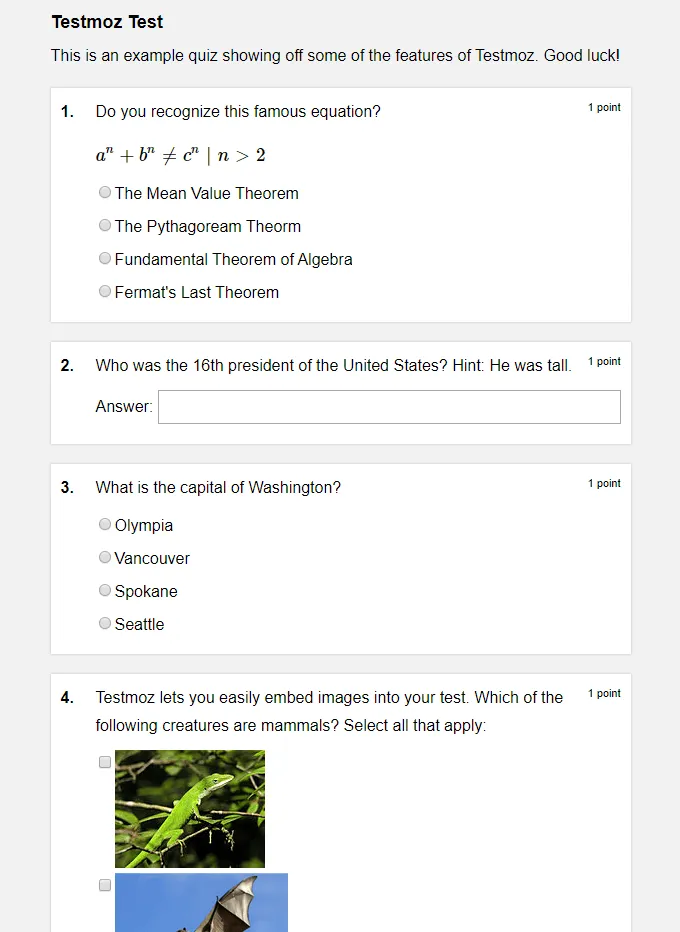
Testmoz is a simple online test generator for teachers, trainers, and employers. You adjust a few settings, add your questions on one page, and share a link with your students. Tests are auto-graded, and the results page shows scores, detailed statistics, and individual answers at a glance. It supports many question types, from multiple choice to essays and file uploads. The tool works on phones and slow connections too. Check the official Testmoz site for current features and plan details.
Key Features
1. Many Question Types
Use multiple choice, true/false, fill in the blank, matching, ordering, short answer, numeric, essay, and file uploads. Every common format is covered.
2. Question Banks and Pools
Store questions in banks and pull random sets for each test taker. Retakes stay fresh because no two tests look the same.
3. Randomization Controls
Shuffle question order and answer choices for each taker. You can pin key questions so they stay fixed while the rest move.
4. Auto-Grading and Re-Grading
Tests grade themselves on submit, including partial credit and negative marking. If you fix a mistake, re-grading updates every score automatically.
5. Deep Results Management
Search, sort, filter, tag, and archive results with ease. You can email scores to takers, print reports, and export everything to CSV.
6. Time Limits and Access Rules
Set time limits, open and close dates, and max attempts per student. You control exactly when and how often tests can be taken.
7. Print Paper Copies
Turn any online test into a printed paper version for in-class use. This helps when devices are limited or the internet is down.
8. Works on Low Bandwidth
Tests load fast on phones, tablets, and desktops, even on spotty connections. If a browser closes, the student's test restores automatically.
Frequently Asked Questions (FAQ)
How do students access my test?
Testmoz gives you a simple URL for each test. You email it to students or post it on your website, and they start right away.
Can I reuse tests year after year?
Yes. You can copy quizzes, combine them, and import questions from your other tests, so good tests keep working for years.
How do I manage large numbers of results?
The results page loads fast even with thousands of entries. You can search, sort, filter, tag, partition, and archive results.
Can I stop students from cheating?
You can randomize questions and answers, set time limits and attempt caps, and use passwords or access restrictions. Check the official site for current options.
Does Testmoz work on phones and slow internet?
Yes. It works in any browser on phones, tablets, and desktops, and handles low-bandwidth and spotty connections well.
Can I import questions from Excel?
Yes. You can import questions from a properly formatted Excel file, or pull questions in from your other Testmoz quizzes.
Conclusion
Testmoz suits teachers and trainers who want test creation without the learning curve. It is quick to build, easy to share, and the results tools handle grading and reporting well. Paper copies and low-bandwidth support cover tricky classroom situations. It is a dependable pick for straightforward, no-fuss online testing. See the official site for current plan details.
Keep exploring
Similar AI tools
Ranked by the job they do, their capabilities, and how closely they fit this workflow.