
Brisk Teaching
AI assistant for lesson planning, feedback, and quizzes
Upvotes
0
Pricing
Freemium
Category
Tools for Teachers
In the database since
Oct 2026
Overview
About Brisk Teaching
Brisk Teaching is an AI Chrome extension built for teachers. It works inside Google Docs, Slides, YouTube, and web pages, so you create materials without switching apps. Teachers use it to draft lesson plans, generate quizzes and rubrics, and give personalized feedback on student writing in seconds. The extension also changes reading levels and translates content into more than 50 languages for diverse classrooms. Schools can deploy it district-wide with admin controls and AI governance tools. For current features and availability, check the official Brisk Teaching site.
Key Features
1. Works Where You Teach
Brisk lives inside Chrome and your teaching apps, from Google Docs to YouTube. Open any page or file and ask it to build from it.
2. Lesson Plan Generator
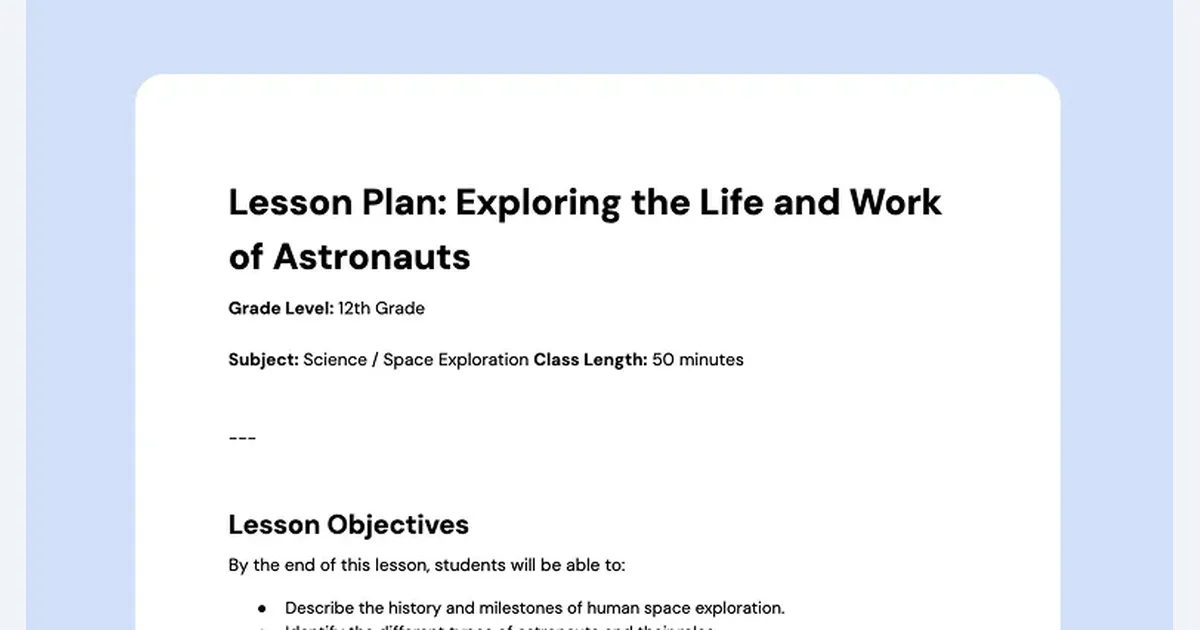
Turn any article, video, or idea into a structured lesson plan with objectives, activities, and timings in a few seconds.
3. Quiz and Assessment Maker
Generate multiple-choice, short-answer, and rubric-scored assessments from the content you already teach with every day.
4. Glow and Grow Feedback
Leave personalized feedback on student writing in your own voice. Essay 100 gets the same care as essay 1.
5. Inspect Writing
Analyze student submissions for depth of thought, structure, and originality with automated insights before you grade.
6. Change Reading Level
Adjust any text to a different reading level or translate it into more than 50 languages to support every learner.
7. Brisk Boost for Students
Turn any online resource into a safe, interactive AI activity that students explore with teacher oversight built in.
Frequently Asked Questions (FAQ)
How do I install Brisk Teaching?
Install the Brisk extension from the Chrome Web Store and it appears inside Google Docs, Slides, YouTube, and other web pages. Setup takes seconds, and you can start generating lesson materials right away.
Which apps does Brisk work with?
Brisk works inside your browser on Google Docs, Google Slides, YouTube, PDFs, and web articles. It also connects with the classroom tools teachers already use, including Google and Microsoft platforms.
What does Inspect Writing show?
Inspect Writing analyzes student submissions for depth of thought, structural integrity, and originality. Teachers see automated insights about how students wrote and revised, which helps before grading.
Can students use Brisk themselves?
Students use Brisk Boost, a teacher-initiated activity that turns online resources into safe interactive experiences. Students never get unsupervised AI chat; the teacher sets the boundaries and monitors activity.
Is Brisk safe for school data?
Brisk holds a 95% Common Sense Privacy Rating and publishes a dedicated privacy center. Schools can request an IT approval packet, and districts get admin controls for AI governance.
Does Brisk replace lesson planning?
No. Brisk drafts lesson plans, quizzes, and feedback fast, but the teacher reviews and edits everything. You stay in control of standards, tone, and what reaches students.
Conclusion
Brisk Teaching puts a capable AI assistant inside the browser tabs teachers already open every day. It drafts lesson plans, builds quizzes, gives feedback, and differentiates text in seconds. The teacher-controlled design and strong privacy rating make it easy for schools to adopt. For educators who want AI that works where they work, Brisk is a practical pick.
Keep exploring
Similar AI tools
Ranked by the job they do, their capabilities, and how closely they fit this workflow.