
FlowSavvy
Auto time-blocking: your to-do list becomes a smart calendar
Upvotes
0
Pricing
Freemium
Category
Project Management
In the database since
Oct 2026
Overview
About FlowSavvy
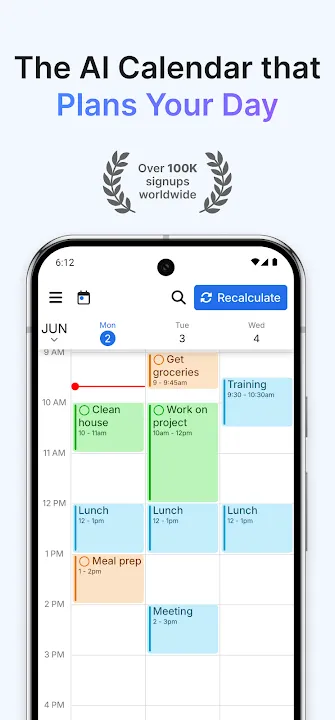
A long to-do list means nothing if you never find time for it. FlowSavvy is an AI schedule planner that turns your tasks into a time-blocked calendar automatically. You add tasks with durations and due dates, and FlowSavvy places them into open slots around your existing events. When plans change or you fall behind, it rebuilds your whole schedule with one click. It syncs with Google Calendar, Outlook and iCloud, and it is designed for individuals who want a realistic plan for every day.
Key Features
1. Automatic Time Blocking
Add tasks with durations and deadlines, and FlowSavvy schedules them into your calendar as concrete blocks, up to eight weeks ahead.
2. One-Click Rescheduling
When a meeting runs long or a task is missed, one tap rebuilds your entire schedule and shifts everything to the next free slots.
3. Workload Balancing
FlowSavvy splits large tasks across days and spreads work evenly, so no single day gets overloaded and deadlines stay reachable.
4. Custom Scheduling Hours
Tell FlowSavvy when you are willing to work, with separate hours for work and personal time, and it plans inside those windows.
5. Flexible Repeating Tasks
Build habits with repeating tasks for workouts, study or routines. FlowSavvy finds time for each occurrence and adjusts around conflicts.
6. Color-Coded Urgency
Tasks are colored green, orange or red based on how close their scheduled time is to the deadline, so risks stand out instantly.
7. Two-Way Calendar Sync
It syncs both ways with Google Calendar, Outlook and iCloud. Scheduled tasks appear as events, and existing events block busy time.
8. Quick-Capture Inbox
Jot tasks into the inbox in seconds and schedule them later, so ideas never get lost while you stay focused on today.
Frequently Asked Questions (FAQ)
How does FlowSavvy schedule my tasks?
It looks at each task's duration, due date and priority, plus your scheduling hours and existing events, then places time blocks where they fit best.
What happens when my plans change?
FlowSavvy rebuilds your whole schedule automatically. Missed or moved tasks shift to the next available slots, and nothing gets deleted.
Which calendars does it work with?
Google Calendar, Outlook and iCloud, with two-way sync. Tasks you schedule appear as calendar events, and your events are respected as busy time.
Is FlowSavvy made for teams?
No, it is built for individuals. There are no assignees or shared projects; it focuses on turning one person's task list into a solid schedule.
How far ahead can it plan?
It can generate optimized time blocks from your to-do list up to eight weeks ahead, so long-term deadlines get realistic slots.
Which platforms are supported?
FlowSavvy has fully functional apps for iOS, Android and the web, all staying in sync.
Conclusion
FlowSavvy answers the hardest planning question: when will I actually do this? It turns a messy list into a realistic calendar, then keeps it realistic when life happens. The automatic rebuilding saves the daily chore of dragging blocks around. If you live by your calendar, it is a focused tool that does one job well.
Keep exploring
Similar AI tools
Ranked by the job they do, their capabilities, and how closely they fit this workflow.