
Hemingway Editor
Readability editor that makes prose bold and clear.
Upvotes
0
Pricing
Freemium
Category
Writing Generators
In the database since
Oct 2026
Overview
About Hemingway Editor
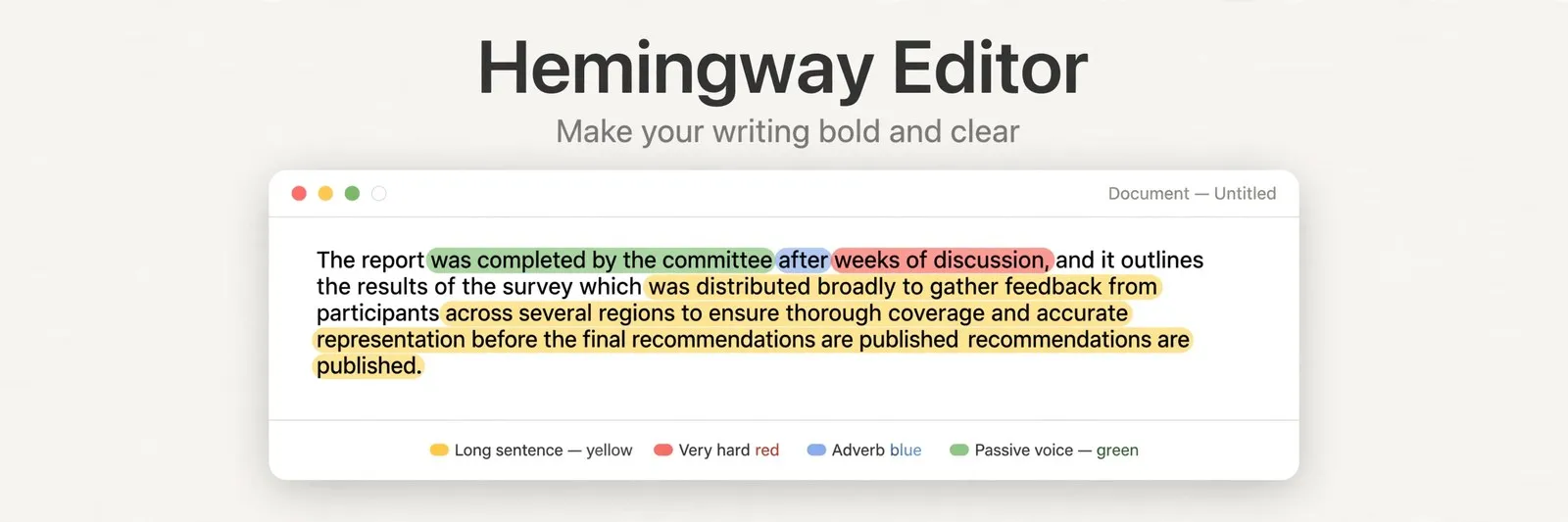
Hemingway Editor is a readability tool that makes your writing bold and clear. Paste in your text and it highlights problems in color: yellow for long, hard sentences, red for very hard ones, blue for adverbs, green for passive voice, and purple for words with simpler options. It also scores your reading grade level. The web version is fully usable with no account, while the desktop app and Plus tier add more. Check the official site for current plan details.
Key Features
1. Color-Coded Highlights
Yellow marks hard sentences, red marks very hard ones, blue marks adverbs, green marks passive voice, and purple suggests simpler words.
2. Readability Grade Score
A grade-level number shows how easy your text is to read, so you can aim lower for wider audiences.
3. AI Sentence Rewrites (Plus)
The Plus tier suggests instant AI rewrites for wordy sentences and passive voice, counted by corrected sentences.
4. Free Web Editor
The full highlighter, grade panel, and word counts run in the browser with no sign-up and no payment.
5. Offline Desktop App
A one-time purchase gives you Mac and Windows apps that work without internet and export to more formats.
6. Publishing and Export
Send drafts straight to WordPress or Medium, or export as HTML, Markdown, Word, PDF, or plain text.
Frequently Asked Questions (FAQ)
Does Hemingway check grammar and spelling?
No. Hemingway checks readability and style, not grammar. The base editor will not fix spelling or punctuation; only the Plus tier adds AI grammar fixes. Pair it with a grammar checker for full proofreading.
What is the difference between the free editor, the desktop app, and Plus?
The web editor is no-cost and needs no account. The $19.99 desktop app adds offline use and more export options but no AI. Plus is a subscription that adds AI rewrites and grammar fixes, starting with a two-week trial.
What do the colors mean?
Yellow means a long or complex sentence to shorten. Red means very hard to read. Blue flags adverbs, green flags passive voice, and purple offers a simpler word choice.
Can I publish directly from Hemingway?
Yes. The desktop app and Plus publish to WordPress and Medium in one click, and you can export formatted text for other platforms.
Is Hemingway good for academic or legal writing?
Not always. It pushes short, simple sentences, which can strip needed precision from technical or legal text. Use it for clarity, not as a universal rule.
Conclusion
Hemingway Editor trains you to write shorter, clearer sentences with instant color feedback. It suits bloggers, students, and anyone whose readers skim. The no-cost web version covers the core tool, while the desktop app and Plus add convenience and AI. It will not check your grammar, so pair it with a proofreader. Keep it in your toolkit for clearer drafts.
Keep exploring
Similar AI tools
Ranked by the job they do, their capabilities, and how closely they fit this workflow.