Upvotes
0
Pricing
Free
Category
Image Editing
In the database since
Oct 2026
Overview
About FaceSwapGif
What Is FaceSwapGif?
FaceSwapGif is an online AI tool that swaps faces inside animated GIFs. Upload a GIF and a photo of a face you are authorized to use, and the tool renders a new GIF with that face mapped onto the original — no editing software or frame-by-frame work required.
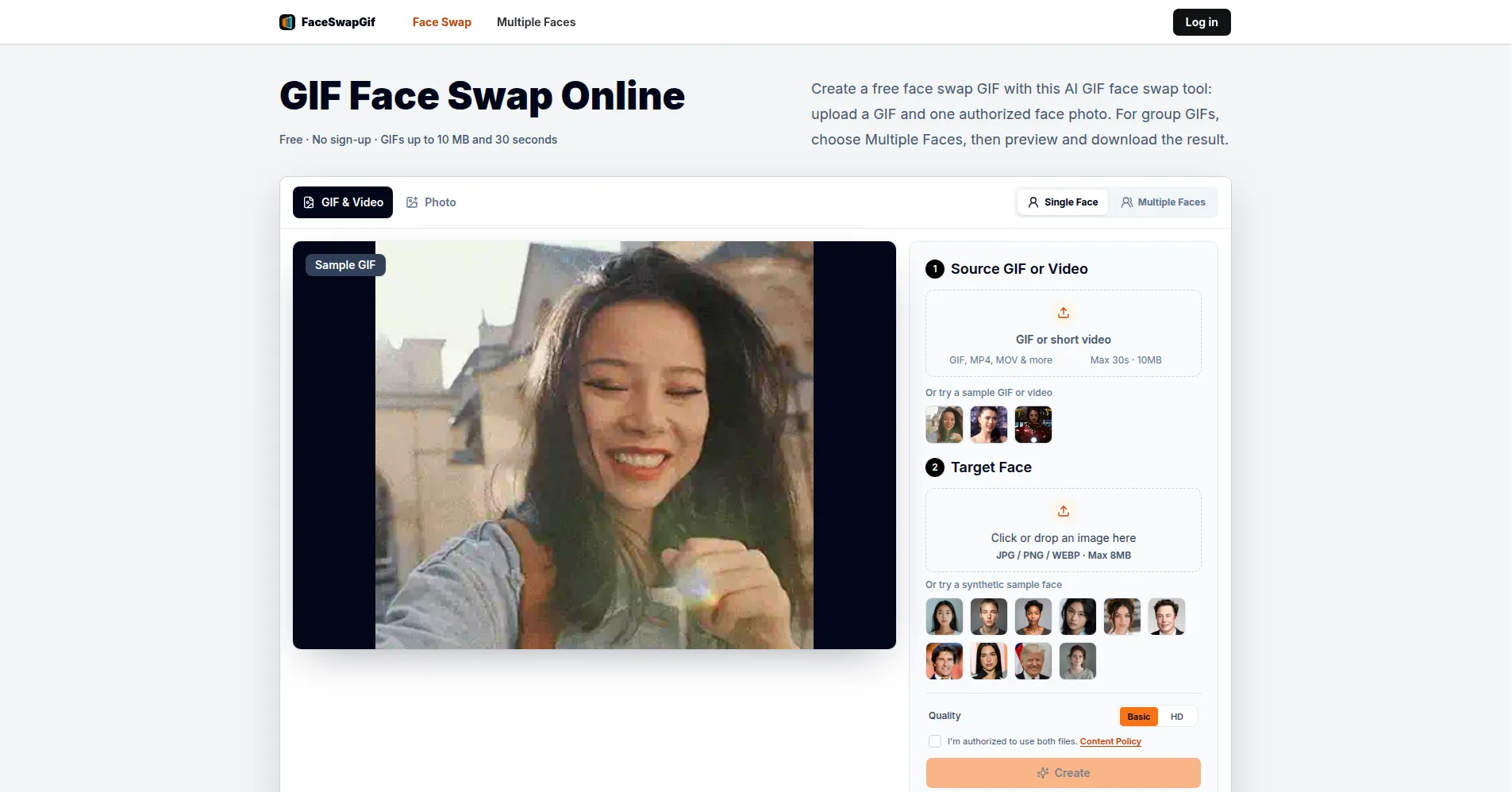
The workflow is deliberately simple and runs entirely in the browser. The basic GIF workflow is free with no sign-up: pick a source GIF (or a short video up to 30 seconds and 10 MB), add a clear face photo (JPG, PNG, or WEBP up to 8 MB), confirm you have permission to use the face, then start the task, preview the result, and download it.
The tool is aimed at meme makers, social media creators, and anyone who wants a personalized reaction GIF without learning video editing. For group GIFs, a Multiple Faces mode detects each face in the scene and lets you map a different authorized photo to each one. Everything you create is listed under My Creations in the browser, where you can preview, download, or delete it.
Key Features
1. AI GIF face swapping
Upload an animated GIF and one authorized face photo, and the tool generates a face-swapped version of the GIF for preview and download.
2. Short video input
Upload a short video (GIF, MP4, MOV, or similar, up to 30 seconds and 10 MB) and receive the swapped result as a shareable GIF.
3. Multiple face mode
Detect every face in a group GIF or video and map a different authorized replacement photo to each one in a single task.
4. No sign-up required
The basic GIF workflow runs free in the browser with no account, and recent creations stay available under My Creations on the same device.
5. Built-in samples
Try the tool instantly with a sample GIF or a synthetic sample face, so no personal uploads are needed for a first test.
6. Preview, download, and delete
Every finished task can be opened for a full preview, downloaded as a GIF, or deleted from My Creations at any time.
7. Responsible-use safeguards
The workflow asks you to confirm permission for every face, and a content policy plus abuse reporting cover misuse such as impersonation or harassment.
Frequently Asked Questions
How do I make a face swap GIF online?
Upload a GIF and one authorized face photo, confirm you have permission to use the face, then use the on-page tool to create, preview, and download the resulting face swap GIF.
What GIF size and duration are supported?
The current workflow accepts a source GIF up to 10 MB and 30 seconds long; face photos can be JPG, PNG, or WEBP files up to 8 MB, and these checks run before generation starts.
Can I swap multiple faces in one GIF?
Yes. The Multiple Faces mode detects the target faces in one GIF or video and lets you map an authorized replacement photo to each one.
Do I need an account to generate a GIF?
No account is needed for GIF generation on the homepage, and guest creations remain available in My Creations in the same browser; photo, multiple-face, batch, HD, and additional usage require sign-in.
Can I delete my creation?
Yes. Guests and signed-in users can preview, download, or delete their completed tasks from My Creations, with guest results tied to the browser they were made in.
What uses are not allowed?
You must not upload faces without permission or use the tool for minors, sexual content, impersonation, fraud, harassment, political deception, or illegal activity; the site publishes a content policy and a report-abuse option.
Conclusion
FaceSwapGif does one thing and keeps it simple: AI face swaps for GIFs and short videos, free in the browser with no sign-up. The permission confirmation, before-and-after gallery, and delete-anytime controls make it approachable for casual creators, while the Multiple Faces mode and video-to-GIF input cover the common cases a meme maker needs. Just use it responsibly — only with faces you are authorized to use.
Keep exploring
Similar AI tools
Ranked by the job they do, their capabilities, and how closely they fit this workflow.